> ## Documentation Index
> Fetch the complete documentation index at: https://v0.x-docs.novu.co/llms.txt
> Use this file to discover all available pages before exploring further.
# MS Teams
> Learn about how to use MS Teams provider for chat notifications
export const provider_0 = "Microsoft Teams"
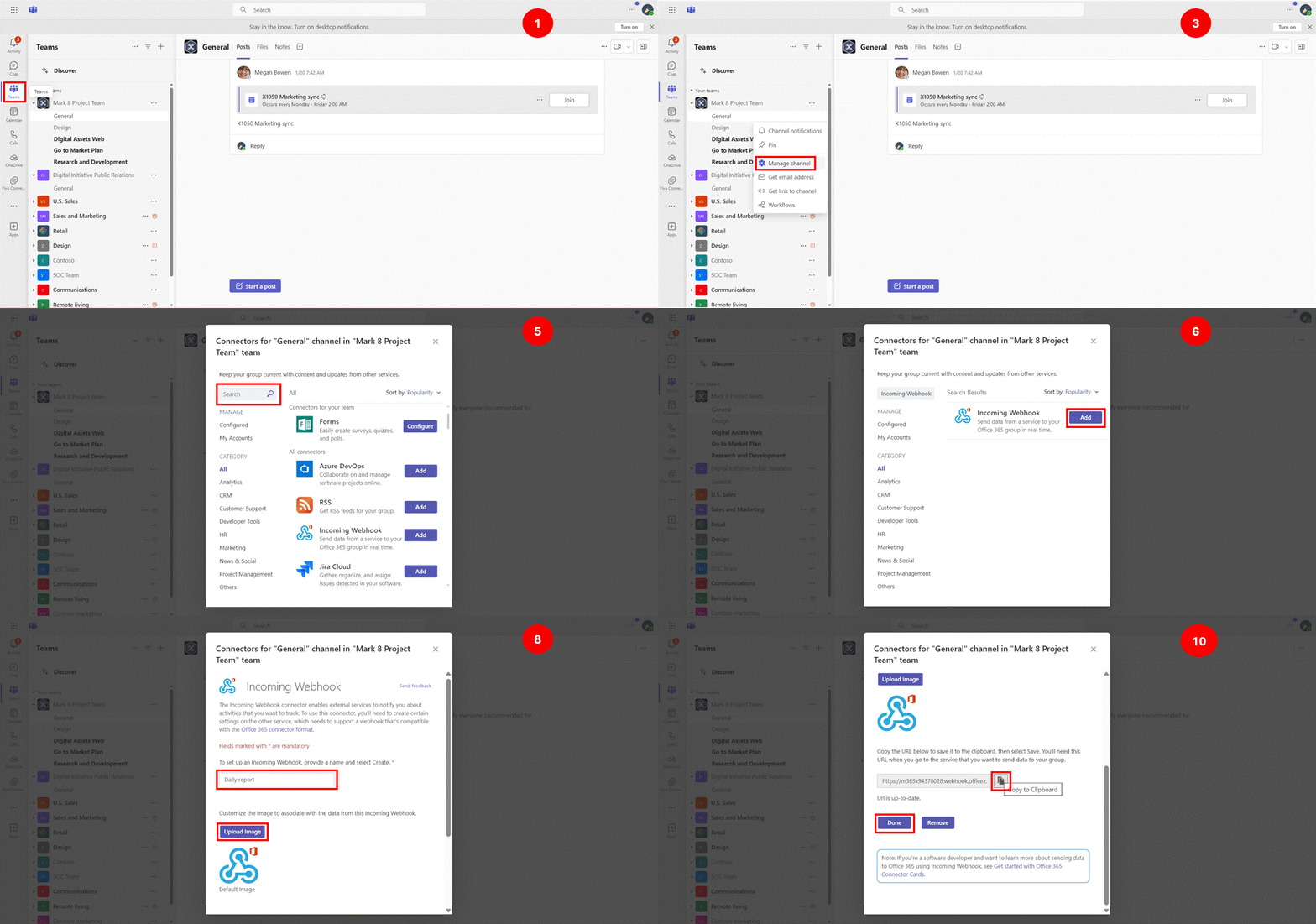
MS Teams does not need any `API Key` or `Client ID` to send notifications. Our current implementation is based on the [Incoming Webhook URL](https://learn.microsoft.com/en-us/microsoftteams/platform/webhooks-and-connectors/how-to/add-incoming-webhook?tabs=newteams%2Cjavascript). It is a URL that you can use to send messages to a specific channel. This URL needs to be stored on the subscriber entity
Similar to [Discord](https://www.notion.so/Additional-Resources-65ef4aca5d0f4115947030c2f5705101?pvs=21), the credential for this provider needs to be stored in the [subscriber entity](/api-reference/subscribers/update-subscriber-credentials).
## Creating incoming webhook URL
Checkout step by step instructions on microsoft team's documentation on how to [create an incoming webhook url](https://docs.microsoft.com/en-us/microsoftteams/platform/webhooks-and-connectors/how-to/add-incoming-webhook?tabs=newteams%2Cjavascript).
 ## Storing webhook url on subscriber entity
The URL generated above will be the target channel of a subscriber that you want to integrate with. To make this connection, you have to:
1. Copy the URL that you generated above
2. Update the subscriber credentials with this URL using the MS Teams provider id. You can do this step by using the `@novu/node` library, as shown below:
```javaScript theme={null}
import {
Novu,
ChatProviderIdEnum
} from '@novu/node';
const novu = new Novu("");
await novu.subscribers.setCredentials(
'subscriberId',
ChatProviderIdEnum.MsTeams, // providerId
{ webhookUrl: "" },
'msteams-MnGLxp8uy' // integration identifier
);
```
```bash theme={null}
curl -L -X PUT 'https://api.novu.co/v1/subscribers//credentials' \
-H 'Content-Type: application/json' \
-H 'Accept: application/json' \
-H 'Authorization: ApiKey ' \
-d '{
"providerId": "msteams",
"credentials": {
"webhookUrl": ""
},
"integrationIdentifier": "msteams-MnGLxp8uy"
}'
```
Checkout the [API reference](/api-reference/subscribers/update-subscriber-credentials) for more details.
* `subscriberId` is a custom identifier used when identifying your users within the Novu platform.
* `providerId` is a unique provider identifier. We recommend using our ChatProviderIdEnum to specify the provider.
* The third parameter is the credentials object, in this case, we use the `webhookUrl` property to specify the MS Teams channel webhook URL or by calling the `Update Subscriber Credentials` endpoint on Novu API. Check endpoint details [here](https://docs.novu.co/api/update-subscriber-credentials/).
If you are looking to use {provider_0} provider in different way or your usecase is not covered by this documentation, you can always reach out to our team at [support@novu.co](mailto:support@novu.co) or via [Discord](https://discord.novu.co)
## Storing webhook url on subscriber entity
The URL generated above will be the target channel of a subscriber that you want to integrate with. To make this connection, you have to:
1. Copy the URL that you generated above
2. Update the subscriber credentials with this URL using the MS Teams provider id. You can do this step by using the `@novu/node` library, as shown below:
```javaScript theme={null}
import {
Novu,
ChatProviderIdEnum
} from '@novu/node';
const novu = new Novu("");
await novu.subscribers.setCredentials(
'subscriberId',
ChatProviderIdEnum.MsTeams, // providerId
{ webhookUrl: "" },
'msteams-MnGLxp8uy' // integration identifier
);
```
```bash theme={null}
curl -L -X PUT 'https://api.novu.co/v1/subscribers//credentials' \
-H 'Content-Type: application/json' \
-H 'Accept: application/json' \
-H 'Authorization: ApiKey ' \
-d '{
"providerId": "msteams",
"credentials": {
"webhookUrl": ""
},
"integrationIdentifier": "msteams-MnGLxp8uy"
}'
```
Checkout the [API reference](/api-reference/subscribers/update-subscriber-credentials) for more details.
* `subscriberId` is a custom identifier used when identifying your users within the Novu platform.
* `providerId` is a unique provider identifier. We recommend using our ChatProviderIdEnum to specify the provider.
* The third parameter is the credentials object, in this case, we use the `webhookUrl` property to specify the MS Teams channel webhook URL or by calling the `Update Subscriber Credentials` endpoint on Novu API. Check endpoint details [here](https://docs.novu.co/api/update-subscriber-credentials/).
If you are looking to use {provider_0} provider in different way or your usecase is not covered by this documentation, you can always reach out to our team at [support@novu.co](mailto:support@novu.co) or via [Discord](https://discord.novu.co)