> ## Documentation Index
> Fetch the complete documentation index at: https://v0.x-docs.novu.co/llms.txt
> Use this file to discover all available pages before exploring further.
# Recipes
This cookbook contains recipes and code samples demonstrating how to accomplish everyday tasks with Novu in your application. Each code example uses our libraries and SDKs.
 ## Fetch Subscriber Feed
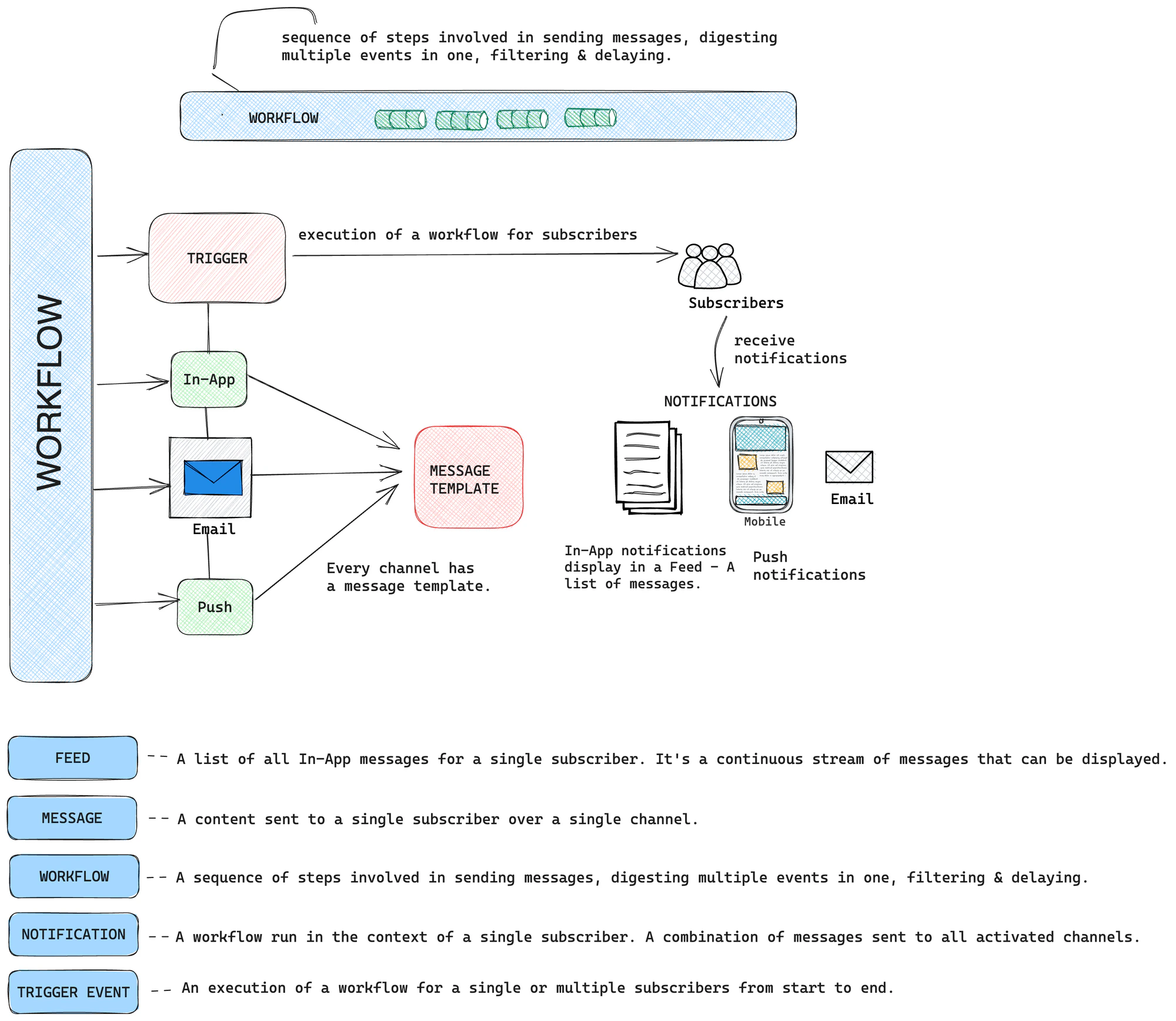
A subscriber feed is a list of all In-App messages for a single subscriber. It's a continuous stream of messages displayed in a list that subscribers can scroll through on the frontend via the Notification Center.
It is a dynamic list with **seen** and **unseen** capabilities. Multiple feeds can exist for a subscriber.
**Subscriber Feed** is very different from **Activity Feed**. The former is for In-App channels, while the latter is a list of every message and relevant metadata across all channels shown in your dashboard.
The code sample below fetches the list of all In-App messages sent to a specific subscriber:
```javascript Node.js theme={null}
const { data: inAppMessages } = await novu.subscribers.getNotificationsFeed('subscriberId', {
page: 0,
limit: 10,
// it is of type string. By default all feeds messages are fetched
feedIdentifier: 'Marketing',
// seen and read filter of type boolean
seen: true,
read: true
});
```
## Fetch All Feeds
In-App messages are grouped in Feeds. There can be one or multiple feeds.
The code sample below fetches all the feeds that have been created and exist in the In-App steps:
```javascript Node.js theme={null}
const { data: feedsData } = await novu.feeds.get();
```
## Delete a Message From a Feed
A message is a content sent to a single subscriber over a single channel. Some messages are simple, like SMS, while others have more features and capabilities, such as Email, Chat, In-App.
A single message can be deleted from a Feed. The code sample below shows how to do it:
```javascript Node.js theme={null}
await novu.messages.deleteById('messageId');
```
## Fetch all Messages Sent To All Subscribers
You can retrieve all messages sent to all subscribers. There are a couple of filters you can apply to fetch these messages.
* channel: fetches all messages that were sent via a specific channel, e.g Email, Sms, Push, In-App
* subscriberId: fetches all messages sent to a specific subscriber
* transactionIds: fetches all messages via transaction ids.
```javascript Node.js theme={null}
import { ChannelTypeEnum } from '@novu/node';
// All fields are optional
const listMessagesOptions = {
// pagination options
page: 0,
limit: 20,
/**
* Filter options
*/
// use ChannelTypeEnum.PUSH for push, ChannelTypeEnum.IN_APP for in-app,
channel: ChannelTypeEnum.EMAIL, // only email type messages will be fetched
subscriberId: '6444105141ffb0919496dfcb',
transactionIds: ['644-41051-41ffb0-919496-dfcb'],
};
const { data: messagesData } = await novu.messages.list(listMessagesOptions);
```
## Mark an In-App Message as Read/Seen
You can mark an In-App message as read/seen. Messages from other channels: **Email**, **Push**, **Chat**, **Sms** can't be marked as read/seen.
```javascript Node.js theme={null}
const { data: markMessageAsRead } = await novu.subscribers.markMessageRead(
'subscriberId',
'messageId'
);
const { data: markMessageAsSeen } = await novu.subscribers.markMessageSeen(
'subscriberId',
'messageId'
);
```
## Mark an In-App Message as Read/Unread/Seen/Unseen
You can mark an In-App message as read/unread/seen/unseen. Messages from other channels: **Email**, **Push**, **Chat**, **Sms** can't be marked as read/unread/seen/unseen.
```javascript Node.js theme={null}
const { data: markMessageAs } = await novu.subscribers.markMessageAs(
'subscriberId',
'messageId',
{ seen: true, read: false }
);
```
## Mark all In-App Messages as Read/Unread/Seen/Unseen
You can mark all In-App messages as read/unread/seen/unseen.
Messages from other channels: **Email**, **Push**, **Chat**, **Sms** can't be marked as read/unread/seen/unseen.
```javascript Node.js theme={null}
import { MarkMessagesAsEnum } from "@novu/node"
const { data: markAllInAppMessages } = await novu.subscribers.markAllMessagesAs(
'subscriberId',
// can be filtered with feed identifiers
feedIdentifier: ['Marketing', 'Product']
// MarkMessageAsEnum.READ => It will mark all messages as read
// MarkMessageAsEnum.SEEN => It will mark all messages as seen
// MarkMessageAsEnum.UNREAD => It will mark all messages as unread
// MarkMessageAsEnum.UNSEEN => It will mark all messages as unseen
markAs: MarkMessageAsEnum.Read
);
```
## Send Slack Notifications
You can send notifications to Slack Channels via Novu like so:
```javascript Node.js theme={null}
import {
Novu,
ChatProviderIdEnum
} from '@novu/node';
const novu = new Novu("");
// Identify Subscriber
await novu.subscribers.identify('', {
firstName: 'newSubForSlackChat',
});
// Set credentials for the Subscriber
await novu.subscribers.setCredentials('', ChatProviderIdEnum.Slack, {
webhookUrl: "",
});
// Trigger slack notification
await novu.trigger('slack', {
to: {
subscriberId: ''
},
payload: {
chatMsg: ''
}
});
```
where `chatMsg` is a payload variable in the workflow editor.
Follow the [full guide](/guides/slack-guide) on how to send Slack notifications using Novu.
## Fetch Subscriber Feed
A subscriber feed is a list of all In-App messages for a single subscriber. It's a continuous stream of messages displayed in a list that subscribers can scroll through on the frontend via the Notification Center.
It is a dynamic list with **seen** and **unseen** capabilities. Multiple feeds can exist for a subscriber.
**Subscriber Feed** is very different from **Activity Feed**. The former is for In-App channels, while the latter is a list of every message and relevant metadata across all channels shown in your dashboard.
The code sample below fetches the list of all In-App messages sent to a specific subscriber:
```javascript Node.js theme={null}
const { data: inAppMessages } = await novu.subscribers.getNotificationsFeed('subscriberId', {
page: 0,
limit: 10,
// it is of type string. By default all feeds messages are fetched
feedIdentifier: 'Marketing',
// seen and read filter of type boolean
seen: true,
read: true
});
```
## Fetch All Feeds
In-App messages are grouped in Feeds. There can be one or multiple feeds.
The code sample below fetches all the feeds that have been created and exist in the In-App steps:
```javascript Node.js theme={null}
const { data: feedsData } = await novu.feeds.get();
```
## Delete a Message From a Feed
A message is a content sent to a single subscriber over a single channel. Some messages are simple, like SMS, while others have more features and capabilities, such as Email, Chat, In-App.
A single message can be deleted from a Feed. The code sample below shows how to do it:
```javascript Node.js theme={null}
await novu.messages.deleteById('messageId');
```
## Fetch all Messages Sent To All Subscribers
You can retrieve all messages sent to all subscribers. There are a couple of filters you can apply to fetch these messages.
* channel: fetches all messages that were sent via a specific channel, e.g Email, Sms, Push, In-App
* subscriberId: fetches all messages sent to a specific subscriber
* transactionIds: fetches all messages via transaction ids.
```javascript Node.js theme={null}
import { ChannelTypeEnum } from '@novu/node';
// All fields are optional
const listMessagesOptions = {
// pagination options
page: 0,
limit: 20,
/**
* Filter options
*/
// use ChannelTypeEnum.PUSH for push, ChannelTypeEnum.IN_APP for in-app,
channel: ChannelTypeEnum.EMAIL, // only email type messages will be fetched
subscriberId: '6444105141ffb0919496dfcb',
transactionIds: ['644-41051-41ffb0-919496-dfcb'],
};
const { data: messagesData } = await novu.messages.list(listMessagesOptions);
```
## Mark an In-App Message as Read/Seen
You can mark an In-App message as read/seen. Messages from other channels: **Email**, **Push**, **Chat**, **Sms** can't be marked as read/seen.
```javascript Node.js theme={null}
const { data: markMessageAsRead } = await novu.subscribers.markMessageRead(
'subscriberId',
'messageId'
);
const { data: markMessageAsSeen } = await novu.subscribers.markMessageSeen(
'subscriberId',
'messageId'
);
```
## Mark an In-App Message as Read/Unread/Seen/Unseen
You can mark an In-App message as read/unread/seen/unseen. Messages from other channels: **Email**, **Push**, **Chat**, **Sms** can't be marked as read/unread/seen/unseen.
```javascript Node.js theme={null}
const { data: markMessageAs } = await novu.subscribers.markMessageAs(
'subscriberId',
'messageId',
{ seen: true, read: false }
);
```
## Mark all In-App Messages as Read/Unread/Seen/Unseen
You can mark all In-App messages as read/unread/seen/unseen.
Messages from other channels: **Email**, **Push**, **Chat**, **Sms** can't be marked as read/unread/seen/unseen.
```javascript Node.js theme={null}
import { MarkMessagesAsEnum } from "@novu/node"
const { data: markAllInAppMessages } = await novu.subscribers.markAllMessagesAs(
'subscriberId',
// can be filtered with feed identifiers
feedIdentifier: ['Marketing', 'Product']
// MarkMessageAsEnum.READ => It will mark all messages as read
// MarkMessageAsEnum.SEEN => It will mark all messages as seen
// MarkMessageAsEnum.UNREAD => It will mark all messages as unread
// MarkMessageAsEnum.UNSEEN => It will mark all messages as unseen
markAs: MarkMessageAsEnum.Read
);
```
## Send Slack Notifications
You can send notifications to Slack Channels via Novu like so:
```javascript Node.js theme={null}
import {
Novu,
ChatProviderIdEnum
} from '@novu/node';
const novu = new Novu("");
// Identify Subscriber
await novu.subscribers.identify('', {
firstName: 'newSubForSlackChat',
});
// Set credentials for the Subscriber
await novu.subscribers.setCredentials('', ChatProviderIdEnum.Slack, {
webhookUrl: "",
});
// Trigger slack notification
await novu.trigger('slack', {
to: {
subscriberId: ''
},
payload: {
chatMsg: ''
}
});
```
where `chatMsg` is a payload variable in the workflow editor.
Follow the [full guide](/guides/slack-guide) on how to send Slack notifications using Novu.