> ## Documentation Index
> Fetch the complete documentation index at: https://v0.x-docs.novu.co/llms.txt
> Use this file to discover all available pages before exploring further.

# Help Center Overview

> Introduction to Novu help center

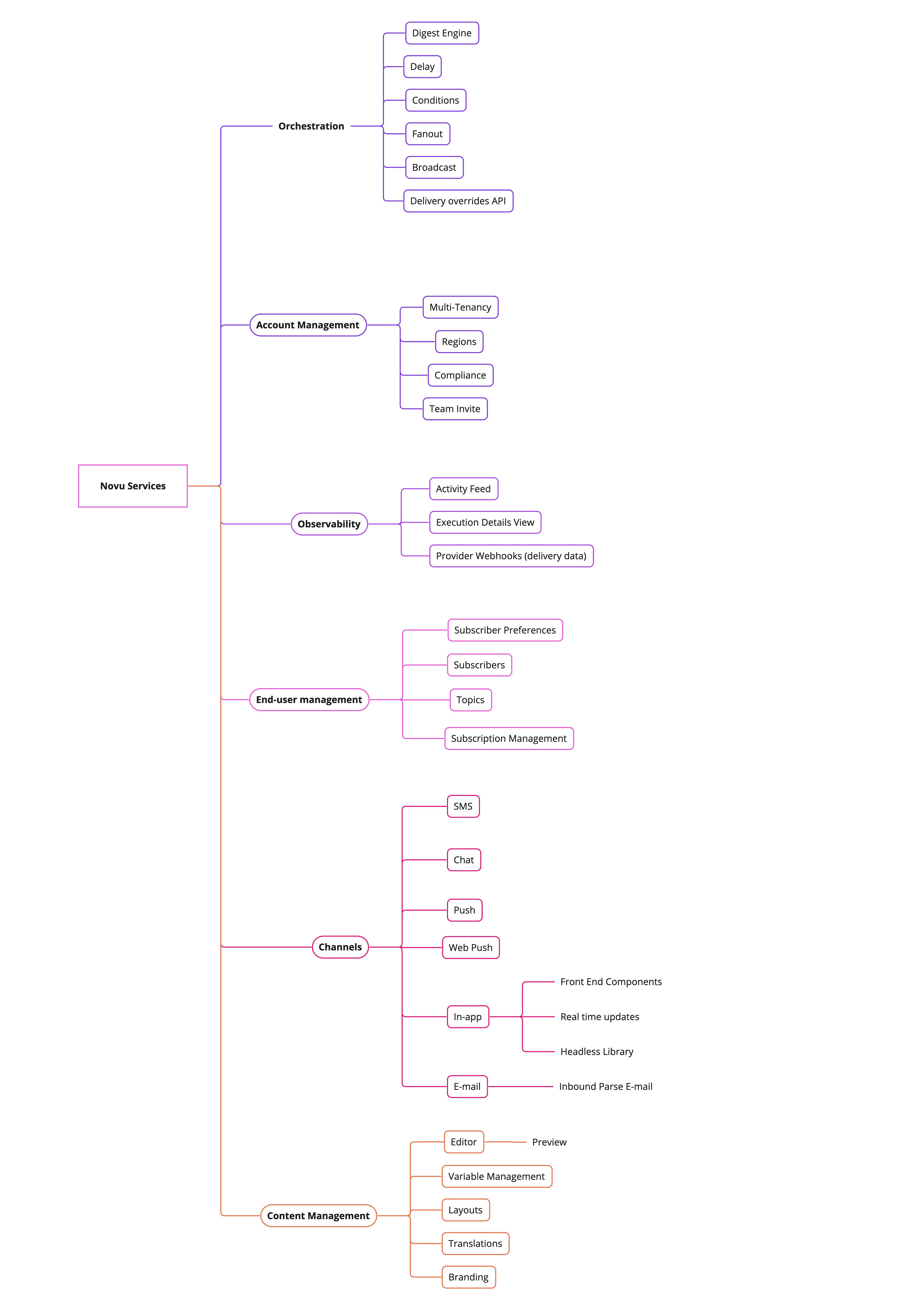
At our Help Center, we're dedicated to provide comprehensive support to ensure your experience with our products and services is seamless and enjoyable. Whether you're a new user looking for guidance or a seasoned customer seeking assistance, we're here to help. Help Center is organized as per our product architecture and is divided into the following sections:

<CardGroup cols={2}>
  <Card title="Account Management" color="#BC002C" href="/help/account-management" icon="user">
    Manage your account and access your data.
  </Card>

  <Card title="User Management" color="#F7DF1E" href="/help/user-management" icon="users">
    Manage subscribers and topics
  </Card>

  <Card title="Channels" color="#00D7FE" href="/help/channels" icon="bars">
    Explore all channels and how to use each one.
  </Card>

  <Card title="Orchestration" color="#47BA87" href="/help/orchestration" icon="screwdriver-wrench">
    Explore orchestration digest, delay, conditions and more.
  </Card>

  <Card title="Content Management" color="#F7DF1E" href="/help/content-management" icon="file-pen">
    Content management, layouts, templates, and more.
  </Card>

  <Card title="Observability" color="#dc2626" href="/help/observability" icon="magnifying-glass">
    Observability, metrics, analytics, and more.
  </Card>

  <Card title="Others" color="#47BA87" href="/help/Others" icon="crystal-ball">
    Others help topics.
  </Card>

  <Card title="FAQs" color="#00D7FE" href="/help/faq" icon="comment">
    Read frequently asked questions
  </Card>
</CardGroup>

<Frame caption="Product Architecture">
  <img src="https://mintcdn.com/novu-v2-docs/iBMuKOgzYB_2VB7w/images/help/overview/product-architecture.jpg?fit=max&auto=format&n=iBMuKOgzYB_2VB7w&q=85&s=80c5483e114ad478a7603ea702fb3354" width="4930" height="6979" data-path="images/help/overview/product-architecture.jpg" />
</Frame>