> ## Documentation Index
> Fetch the complete documentation index at: https://v0.x-docs.novu.co/llms.txt
> Use this file to discover all available pages before exploring further.
# Subscriber Preference
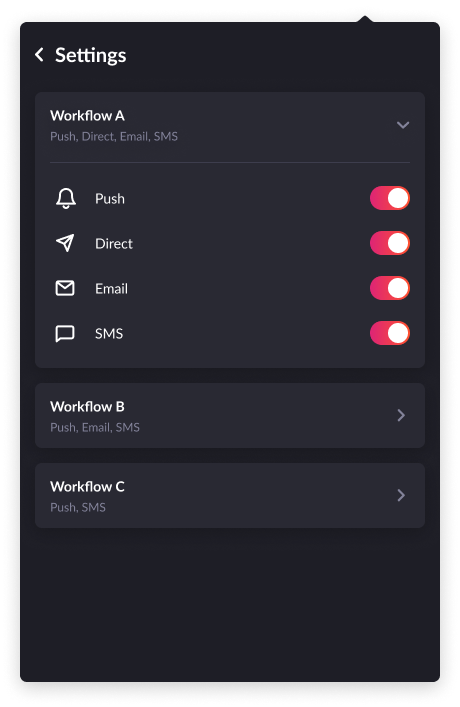
By default, Novu will show the subscriber preferences cog icon on the notification center component. If you want to hide it, you can use the prop `showUserPreferences` on the `PopoverNotificationCenter` component.
Users can enable/disable any active channel in the workflow using subscriber preferences
 ## Get subscriber preferences
```typescript Node.JS theme={null}
import { Novu } from "@novu/node";
const novu = new Novu("");
// 111 is subscriberId
await novu.subscribers.getPreference("111");
```
## Update subscriber preference for a workflow
```typescript Node.JS theme={null}
import { Novu, ChannelTypeEnum } from "@novu/node";
const novu = new Novu("");
// enable in_app channel
await novu.subscribers.updatePreference("subscriberId", "workflowIdentifier", {
enabled: true,
channel: { type: ChannelTypeEnum.IN_APP, enabled: true },
});
// enable email channel
await novu.subscribers.updatePreference("subscriberId", "workflowIdentifier", {
enabled: true,
channel: { type: ChannelTypeEnum.EMAIL, enabled: true },
});
```
Read more about [subscriber preference](/subscribers/preferences).
## Get subscriber preferences
```typescript Node.JS theme={null}
import { Novu } from "@novu/node";
const novu = new Novu("");
// 111 is subscriberId
await novu.subscribers.getPreference("111");
```
## Update subscriber preference for a workflow
```typescript Node.JS theme={null}
import { Novu, ChannelTypeEnum } from "@novu/node";
const novu = new Novu("");
// enable in_app channel
await novu.subscribers.updatePreference("subscriberId", "workflowIdentifier", {
enabled: true,
channel: { type: ChannelTypeEnum.IN_APP, enabled: true },
});
// enable email channel
await novu.subscribers.updatePreference("subscriberId", "workflowIdentifier", {
enabled: true,
channel: { type: ChannelTypeEnum.EMAIL, enabled: true },
});
```
Read more about [subscriber preference](/subscribers/preferences).