> ## Documentation Index
> Fetch the complete documentation index at: https://v0.x-docs.novu.co/llms.txt
> Use this file to discover all available pages before exploring further.
# Preferences
Novu provides a way to store user preferences in the subscribers data model.
This allows subscribers to specify and manage their preferences, without your intervention. Customizing preferences has become the standard expected behavior for people and Novu can take the technical burden of managing preferences off of you.
**Novu allows several levels of preferences:**
* Workflow level channel preferences
* Subscriber level channel preferences
* Global level channel preferences
## Workflow level channel preferences
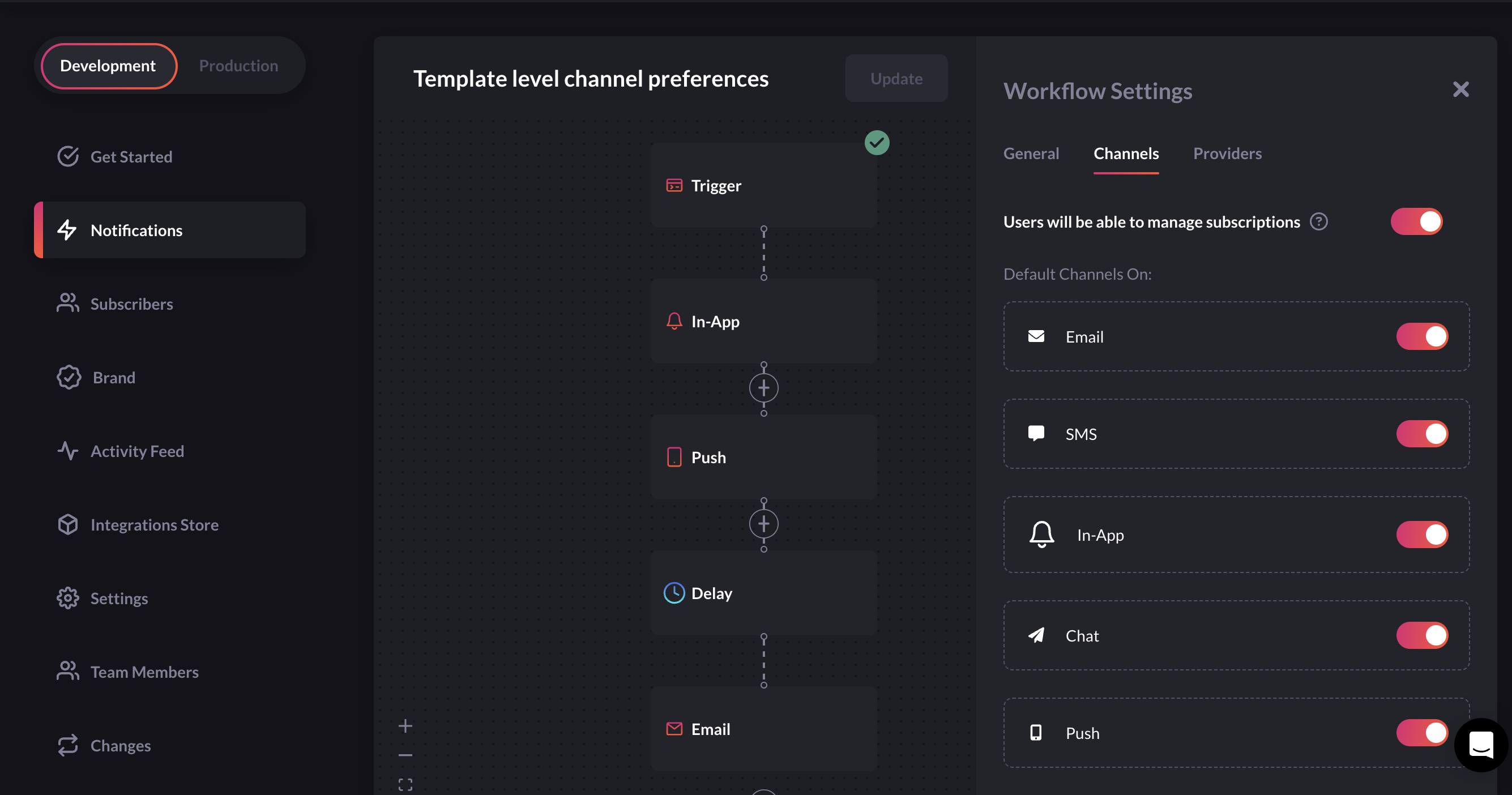
When creating a new workflow on the Web platform, you can specify default preferences for the subscribers in channel settings. They will be used unless the subscriber overrides them by his own custom preference.
This will allow you to create sensible defaults but still provide the user with the ability to override them. Template level preference can be managed in channel settings. All channels are `ON` unless specified otherwise.
`Workflow Settings > Channels`
 ## Subscriber level channel preferences
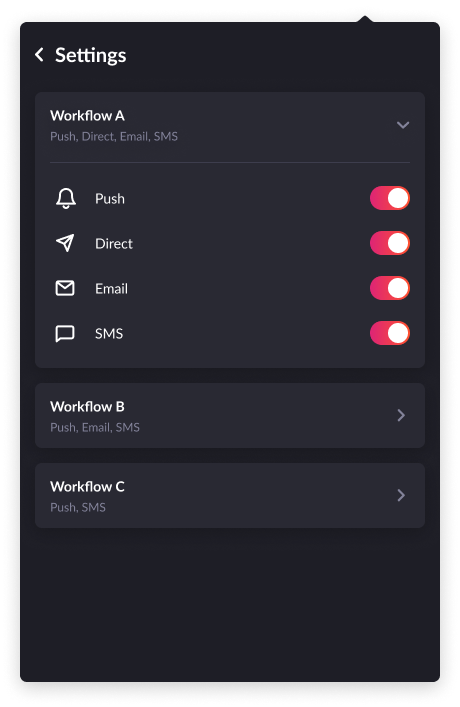
Our notification center component will show a user the available preferences, user will be able to modify on the channel level. Critical workflows will be excluded from the list. Click on cog (setting) icon on notification center component to open subscriber channel preferences page.
## Subscriber level channel preferences
Our notification center component will show a user the available preferences, user will be able to modify on the channel level. Critical workflows will be excluded from the list. Click on cog (setting) icon on notification center component to open subscriber channel preferences page.
 Only channels with a matched step will be returned from the API in
notification center preference page. In case no channel content was found, the
API will return an empty array.
## Global level channel preferences
Since v0.20.0
Subscribers can set global channel preferences, which override individual settings. For instance, if there are 10 workflows, and a subscriber wants to disable SMS notifications for all of them, they can do so with a single global preference.
### Get subscriber global preference
```javascript theme={null}
import { Novu } from '@novu/node';
const novu = new Novu('');
await novu.subscribers.getGlobalPreference("subscriberId" );
```
[Get subscriber's global preference API](/api-reference/subscribers/get-subscriber-global-preferences)
### Update subscriber global preference
```javascript theme={null}
import { Novu } from '@novu/node';
const novu = new Novu('');
// enable in-app channel and disable email channel
await novu.subscribers.updateGlobalPreference("subscriberId", {
enabled: true,
preferences: [{
type: "in_app"
enabled: true
}, {
type: "email"
enabled: false
}]
});
```
[Update subscriber's global preference API](/api-reference/subscribers/update-subscriber-global-preference)
Global subscriber preference can be updated and accessed using API and SDK only. Currently we have not added support of global subscriber preference in UI.
## Exclude workflows from preferences (critical workflow)
In some cases, you don't want the subscriber to be able to unsubscribe from mandatory notifications such as Account Verification, Password Reset, etc...
In those cases you can turn off the toggle `Users will be able to manage subscriptions` in channel settings. Workflow will become `critical`, once this toggle is turned `OFF`. By default, every workflow is `non-critical` and subscribers can manage channel preferences irrespective of workflow-level channel preferences. Critical workflow will not show on the subscriber preferences page.
## Get subscriber preferences
```javascript theme={null}
import { Novu } from "@novu/node";
const novu = new Novu("");
// 111 is subscriberId
await novu.subscribers.getPreference("111");
```
```php theme={null}
use Novu\SDK\Novu;
$novu = new Novu('');
// 111 is subscriberId
$novu->getSubscriberPreferences('111')->toArray();
```
## Get subscriber preference by level
```javascript theme={null}
import { Novu, PreferenceLevelEnum } from '@novu/node';
const novu = new Novu('');
// Get global level preference
await novu.subscribers.getPreferenceByLevel("subscriberId", PreferenceLevelEnum.GLOBAL)
// Get template level preference
await novu.subscribers.getPreferenceByLevel("subscriberId", PreferenceLevelEnum.TEMPLATE);
```
## Update subscriber preference for a workflow
```javascript theme={null}
import { Novu, ChannelTypeEnum } from "@novu/node";
const novu = new Novu("");
// enable in_app channel
await novu.subscribers.updatePreference("subscriberId", "workflowIdentifier", {
enabled: true,
channel: { type: ChannelTypeEnum.IN_APP, enabled: true },
});
// enable email channel
await novu.subscribers.updatePreference("subscriberId", "workflowIdentifier", {
enabled: true,
channel: { type: ChannelTypeEnum.EMAIL, enabled: true },
});
```
```php theme={null}
use Novu\SDK\Novu;
$novu = new Novu('');
// enable in_app channel
$novu->updateSubscriberPreference('subscriberId', 'workflowIdentfier', [
'enabled' => true
'channel' => [
'type' => 'in_app',
'enabled' => true
]
]);
// enable email channel
$novu->updateSubscriberPreference('subscriberId', 'workflowIdentfier', [
'enabled' => true
'channel' => [
'type' => 'email',
'enabled' => true
]
]);
```
## Order of priority of preferences
1. if `Users will be able to manage subscriptions` toggle is turned off i.e workflow is critical, this will override workflow level and subscriber level preferences and notification will always be sent.
2. if workflow is non critical and subscriber has `false` value set for `enabled` field in preference then all other channels will become inactive even if they have `true` state.
3. if workflow is non critical and subscriber has `true` value set for `enabled` field in preference then notification will be filtered based on subscriber channel preference.
4. Workflow level channel preferences will be applied to all subscribers by default unless subscriber overrides them.
`Example`
1. For `First Workflow`, `critical` is false, `enabled` is true, in\_app, email, push channels are true and sms, chat channels are false. As per above order of priority of preferences, notification will be filtered as per the subscriber preferences. The subscriber will receive in-app, email and push notifications, but not receive sms and chat notifications.
2. For `Second Workflow`, `critical` is false, `enabled` is false, all channels are true. As per above order of priority of preferences, subscriber will not receive any type of notification because all channels become disabled due to false value of `enabled` field.
3. For `Third Workflow`. `critical` is true, `enabled` is false, email, chat channels are false and the other three channels are true. As per above order of priority of preferences, subscriber will receive all type of notifications as this workflow is `critical`.
```json theme={null}
{
"template": {
"_id": "firstWorkflowIdentifier",
"name": "First Workflow",
"critical": false
},
"preference": {
"enabled": true,
"channels": {
"in_app": true,
"email": true,
"sms": false,
"push": true,
"chat": false
}
}
}
```
```json theme={null}
{
"template": {
"_id": "secondWorkflowIdentifier",
"name": "Second Workflow",
"critical": false
},
"preference": {
"enabled": false,
"channels": {
"in_app": true,
"email": true,
"sms": true,
"push": true,
"chat": true
}
}
}
```
```json theme={null}
{
"template": {
"_id": "thirdWorkflowIdentifier",
"name": "Third Workflow",
"critical": true
},
"preference": {
"enabled": false,
"channels": {
"in_app": true,
"email": false,
"sms": true,
"push": true,
"chat": false
}
}
}
```
## API
## Frequently Asked Questions
This field can only be changed using API.
In the case of a new workflow, the subscriber will inherit all preferences
from the workflow\.However, after subsequent preference updates, the
subscriber's preferences will not inherit workflow-level preferences.
You can turn off all workflow's channels for a subscriber using [subscriber preference](/subscribers/preferences#subscriber-level-channel-preferences). If all channels are off, then the subscriber will not receive any message from any channel step and hence workflow is disabled for that subscriber
Only channels with a matched step will be returned from the API in
notification center preference page. In case no channel content was found, the
API will return an empty array.
## Global level channel preferences
Since v0.20.0
Subscribers can set global channel preferences, which override individual settings. For instance, if there are 10 workflows, and a subscriber wants to disable SMS notifications for all of them, they can do so with a single global preference.
### Get subscriber global preference
```javascript theme={null}
import { Novu } from '@novu/node';
const novu = new Novu('');
await novu.subscribers.getGlobalPreference("subscriberId" );
```
[Get subscriber's global preference API](/api-reference/subscribers/get-subscriber-global-preferences)
### Update subscriber global preference
```javascript theme={null}
import { Novu } from '@novu/node';
const novu = new Novu('');
// enable in-app channel and disable email channel
await novu.subscribers.updateGlobalPreference("subscriberId", {
enabled: true,
preferences: [{
type: "in_app"
enabled: true
}, {
type: "email"
enabled: false
}]
});
```
[Update subscriber's global preference API](/api-reference/subscribers/update-subscriber-global-preference)
Global subscriber preference can be updated and accessed using API and SDK only. Currently we have not added support of global subscriber preference in UI.
## Exclude workflows from preferences (critical workflow)
In some cases, you don't want the subscriber to be able to unsubscribe from mandatory notifications such as Account Verification, Password Reset, etc...
In those cases you can turn off the toggle `Users will be able to manage subscriptions` in channel settings. Workflow will become `critical`, once this toggle is turned `OFF`. By default, every workflow is `non-critical` and subscribers can manage channel preferences irrespective of workflow-level channel preferences. Critical workflow will not show on the subscriber preferences page.
## Get subscriber preferences
```javascript theme={null}
import { Novu } from "@novu/node";
const novu = new Novu("");
// 111 is subscriberId
await novu.subscribers.getPreference("111");
```
```php theme={null}
use Novu\SDK\Novu;
$novu = new Novu('');
// 111 is subscriberId
$novu->getSubscriberPreferences('111')->toArray();
```
## Get subscriber preference by level
```javascript theme={null}
import { Novu, PreferenceLevelEnum } from '@novu/node';
const novu = new Novu('');
// Get global level preference
await novu.subscribers.getPreferenceByLevel("subscriberId", PreferenceLevelEnum.GLOBAL)
// Get template level preference
await novu.subscribers.getPreferenceByLevel("subscriberId", PreferenceLevelEnum.TEMPLATE);
```
## Update subscriber preference for a workflow
```javascript theme={null}
import { Novu, ChannelTypeEnum } from "@novu/node";
const novu = new Novu("");
// enable in_app channel
await novu.subscribers.updatePreference("subscriberId", "workflowIdentifier", {
enabled: true,
channel: { type: ChannelTypeEnum.IN_APP, enabled: true },
});
// enable email channel
await novu.subscribers.updatePreference("subscriberId", "workflowIdentifier", {
enabled: true,
channel: { type: ChannelTypeEnum.EMAIL, enabled: true },
});
```
```php theme={null}
use Novu\SDK\Novu;
$novu = new Novu('');
// enable in_app channel
$novu->updateSubscriberPreference('subscriberId', 'workflowIdentfier', [
'enabled' => true
'channel' => [
'type' => 'in_app',
'enabled' => true
]
]);
// enable email channel
$novu->updateSubscriberPreference('subscriberId', 'workflowIdentfier', [
'enabled' => true
'channel' => [
'type' => 'email',
'enabled' => true
]
]);
```
## Order of priority of preferences
1. if `Users will be able to manage subscriptions` toggle is turned off i.e workflow is critical, this will override workflow level and subscriber level preferences and notification will always be sent.
2. if workflow is non critical and subscriber has `false` value set for `enabled` field in preference then all other channels will become inactive even if they have `true` state.
3. if workflow is non critical and subscriber has `true` value set for `enabled` field in preference then notification will be filtered based on subscriber channel preference.
4. Workflow level channel preferences will be applied to all subscribers by default unless subscriber overrides them.
`Example`
1. For `First Workflow`, `critical` is false, `enabled` is true, in\_app, email, push channels are true and sms, chat channels are false. As per above order of priority of preferences, notification will be filtered as per the subscriber preferences. The subscriber will receive in-app, email and push notifications, but not receive sms and chat notifications.
2. For `Second Workflow`, `critical` is false, `enabled` is false, all channels are true. As per above order of priority of preferences, subscriber will not receive any type of notification because all channels become disabled due to false value of `enabled` field.
3. For `Third Workflow`. `critical` is true, `enabled` is false, email, chat channels are false and the other three channels are true. As per above order of priority of preferences, subscriber will receive all type of notifications as this workflow is `critical`.
```json theme={null}
{
"template": {
"_id": "firstWorkflowIdentifier",
"name": "First Workflow",
"critical": false
},
"preference": {
"enabled": true,
"channels": {
"in_app": true,
"email": true,
"sms": false,
"push": true,
"chat": false
}
}
}
```
```json theme={null}
{
"template": {
"_id": "secondWorkflowIdentifier",
"name": "Second Workflow",
"critical": false
},
"preference": {
"enabled": false,
"channels": {
"in_app": true,
"email": true,
"sms": true,
"push": true,
"chat": true
}
}
}
```
```json theme={null}
{
"template": {
"_id": "thirdWorkflowIdentifier",
"name": "Third Workflow",
"critical": true
},
"preference": {
"enabled": false,
"channels": {
"in_app": true,
"email": false,
"sms": true,
"push": true,
"chat": false
}
}
}
```
## API
## Frequently Asked Questions
This field can only be changed using API.
In the case of a new workflow, the subscriber will inherit all preferences
from the workflow\.However, after subsequent preference updates, the
subscriber's preferences will not inherit workflow-level preferences.
You can turn off all workflow's channels for a subscriber using [subscriber preference](/subscribers/preferences#subscriber-level-channel-preferences). If all channels are off, then the subscriber will not receive any message from any channel step and hence workflow is disabled for that subscriber